
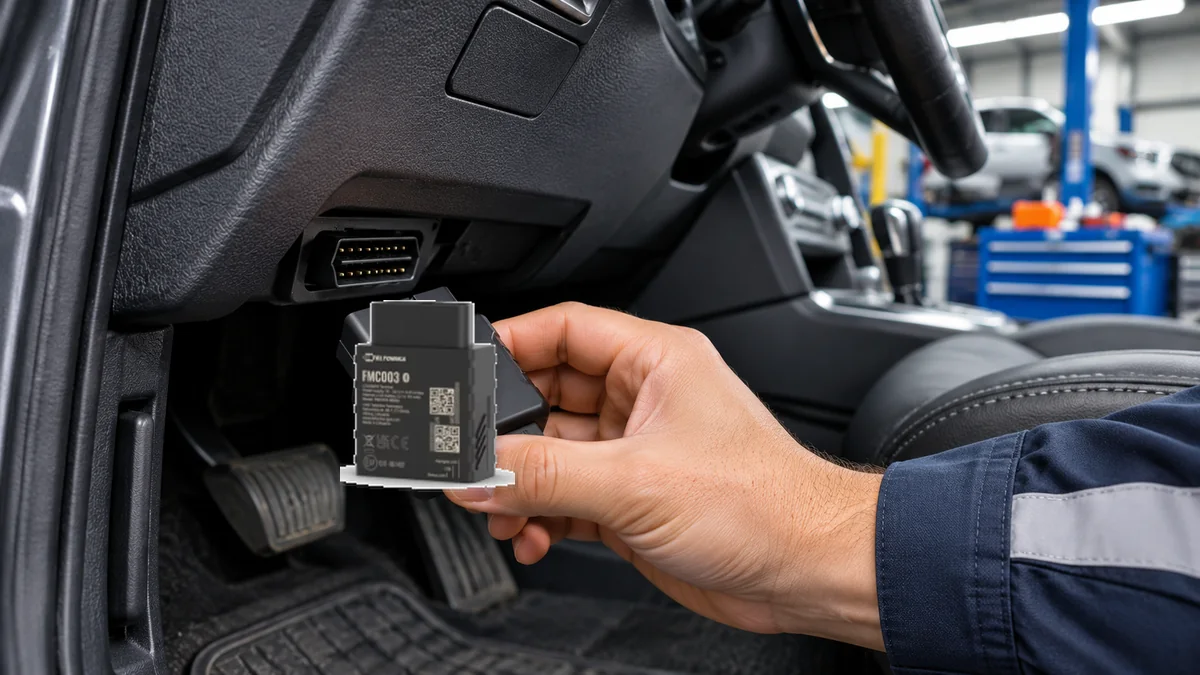
Installing a car tracking device does not always require complicated wiring or professional assistance. An OBD Plug and Play GPS Tracker for Car offers a simpler way to monitor a vehicle by connecting directly to its OBD-II diagnostic port.
For Australian car owners and businesses, this type of tracker can be useful when they want to monitor vehicle location, driving activity and vehicle information without making major changes to the car’s wiring.
But how does an OBD GPS tracker work? Is it compatible with every vehicle? And can you install it yourself?
Let’s look at how these devices operate, what features to consider and whether an OBD tracker is the right choice for your vehicle.
What Is an OBD Plug and Play GPS Tracker for Car?
An OBD Plug and Play GPS Tracker is a compact tracking device that connects to a vehicle’s OBD-II port. OBD stands for On-Board Diagnostics, a system that allows compatible devices to communicate with a vehicle’s electronic systems.
Instead of connecting multiple wires, you simply plug the tracker into the compatible diagnostic port.
Depending on the model, the device may provide:
- GPS vehicle location
- Live tracking through a compatible platform
- Vehicle movement information
- Ignition status
- Driving and trip history
- Selected vehicle diagnostic information
- Alerts and notifications
The available features depend on the tracker, vehicle compatibility and tracking platform.
How Does an OBD GPS Tracker Work?
An OBD GPS tracker combines satellite positioning, mobile communication and, where supported, vehicle data access.
Here is how the process works:
1. Connect the Tracker to the OBD Port
Locate the vehicle’s OBD-II diagnostic port, usually found beneath the dashboard near the steering column. The exact position varies between vehicles.
Plug the compatible GPS tracking device into the port.
2. Receive GPS Location
The tracker uses GPS satellite signals to calculate the vehicle’s location. Some devices may also support additional positioning technologies to improve location information.
3. Send Location Data
Trackers with cellular connectivity send location information to a tracking platform through a supported mobile network.
The platform processes the information and displays it through a mobile application or web dashboard.
4. Monitor Your Vehicle
Once configured, you can check the vehicle’s location and available tracking information remotely.
Depending on the device, you may also receive movement alerts, ignition notifications and trip reports.
Key Features of an OBD Plug and Play GPS Tracker
Not every OBD tracker offers the same functionality. Before choosing one, check which features are supported.
Real-Time GPS Tracking
View your vehicle’s location through a compatible tracking application or web platform. The tracking frequency depends on the device settings, mobile coverage and service plan.
Easy Plug-and-Play Installation
The biggest advantage is its simple installation. You generally do not need to connect separate power wires because the tracker receives power through the OBD port.
Ignition Status Monitoring
Some OBD trackers can identify ignition or vehicle operating status. This helps users understand when a vehicle is being used.
Trip History
Review previous journeys, including available route and travel information. This can be useful for personal vehicle monitoring and business record-keeping.
Vehicle Diagnostic Information
Depending on vehicle compatibility and device capability, an OBD tracker may read selected vehicle information or diagnostic data.
Do not assume every tracker can access every diagnostic parameter. Supported data varies by vehicle manufacturer and model.
Movement Alerts
Some tracking platforms can send notifications when a vehicle starts moving or meets a selected alert condition.
Mobile App Access
A compatible application makes it easier to check vehicle location, review trip history and receive notifications.
How to Install an OBD Plug and Play GPS Tracker
One reason people choose OBD tracking devices is their straightforward installation.
Follow these general steps:
- Find the OBD-II port: Check beneath the dashboard, usually around the steering column.
- Check compatibility: Confirm that the tracker supports your vehicle.
- Plug in the device: Insert the tracker into the OBD-II port securely.
- Complete activation: Follow the manufacturer’s setup instructions, including SIM or platform activation if required.
- Configure tracking: Set up the mobile app or web dashboard.
- Test the device: Check whether it reports the correct location and available vehicle information.
<caption>Important: Avoid forcing the connector into the port. If the device obstructs the driver’s footwell, interferes with vehicle controls or does not fit properly, consult a qualified technician.</caption>
OBD GPS Tracker vs Hardwired GPS Tracker
Both tracking options can monitor vehicles, but their installation methods and practical uses are different.
| Feature | OBD GPS Tracker | Hardwired GPS Tracker |
| Installation | Plugs into OBD port | Connected to vehicle wiring |
| Installation complexity | Generally simple | Usually requires a technician |
| Power supply | OBD port | Vehicle electrical system |
| Portability | Easy to move between compatible vehicles | Usually installed permanently |
| Vehicle data | Available on supported models | Depends on tracker and installation |
| Visibility | May be visible inside the vehicle | Can be installed discreetly |
| Best suited for | Simple installation and temporary use | Permanent vehicle monitoring |
An OBD tracker is a convenient option when easy installation matters. A hardwired device may be more suitable when permanent installation or a more discreet setup is required.
Explore Car Tracking Devices to learn more about vehicle tracking options.
Is an OBD GPS Tracker Compatible with Every Car in Australia?
No. Not every vehicle supports every OBD tracking device.
Compatibility depends on several factors:
- Vehicle make and model
- Manufacturing year
- OBD-II port availability
- Diagnostic protocol support
- Tracker hardware compatibility
- Supported mobile network technology
Many modern vehicles use OBD-II diagnostic systems, but the connector alone does not guarantee that every tracking feature will work.
Before purchasing, check the manufacturer’s compatibility list. This is particularly important for older vehicles, imported models, commercial vehicles and vehicles with unusual diagnostic configurations.
Benefits of OBD GPS Tracking for Businesses
OBD tracking is not limited to individual car owners. It can also support businesses that need visibility over their vehicles.
Rental Car Businesses
Rental operators can use compatible tracking devices to monitor vehicle locations and review trip activity.
Small Business Fleets
Businesses with a small number of cars can use a tracking platform to view vehicle locations and available reports.
Sales and Service Teams
Companies with employees travelling between customer locations can use tracking information to understand vehicle movements and improve trip planning.
Delivery Operations
Businesses using cars for local deliveries can benefit from location visibility and trip history, subject to the device’s capabilities.
For businesses managing several vehicles, explore GPS Fleet Tracking Australia.
Limitations of an OBD Plug and Play GPS Tracker
Although OBD trackers are convenient, they are not suitable for every situation.
The OBD Port May Be Occupied
If another diagnostic device is already connected, you may need a compatible splitter or an alternative tracking solution.
The Device May Be Visible
Because the tracker connects to the diagnostic port, someone inside the vehicle may be able to see or remove it.
Compatibility Can Vary
Some devices support only selected vehicle models or diagnostic protocols.
Power Consumption
An OBD tracker may continue drawing power while the vehicle is parked, depending on its design and configuration. Check its sleep mode and battery protection features to avoid unnecessary battery drain.
Mobile Network Requirements
Remote tracking generally requires a supported communication connection. Check Australian network compatibility, coverage and any SIM or platform charges before buying.
How Much Does an OBD GPS Tracker Cost in Australia?
The total cost depends on the tracker model, connectivity and software features.
Consider these costs when comparing devices:
- Initial hardware purchase
- SIM card and mobile data
- Tracking platform access
- Installation or setup, if required
- Warranty and technical support
Some devices include tracking platform access for a specified period, while others require a separate service plan.
A low purchase price does not always mean a lower total cost. Compare the device features and ongoing charges before making a decision.
Frequently Asked Questions
1. Does an OBD GPS tracker require professional installation?
Usually, no. Most plug-and-play OBD trackers can be connected directly to a compatible OBD-II port. However, professional assistance may be useful if the port is difficult to access or the device creates an installation issue.
2. Can I move an OBD GPS tracker between cars?
Yes, in many cases. You can unplug the device and connect it to another compatible vehicle. However, you should check whether the second vehicle supports the tracker and whether its account or configuration needs updating.
3. Does an OBD GPS tracker work when the car is switched off?
Some devices continue operating in a low-power mode while the vehicle is parked. Their behaviour depends on the hardware, power management and vehicle configuration.
4. Can an OBD GPS tracker drain my car battery?
It can consume power while connected, even when the vehicle is parked. Look for devices with suitable sleep modes and battery protection features. Follow the manufacturer’s recommendations.
5. Does an OBD GPS tracker show live location?
Many cellular-enabled OBD trackers support remote location updates. However, update frequency depends on the device, network coverage and tracking service.
6. Can an OBD GPS tracker read engine fault codes?
Some models support selected diagnostic functions, including reading certain fault codes. Others focus mainly on location tracking. Check the product specifications and vehicle compatibility.
7. Does an OBD GPS tracker need a SIM card?
Many remote tracking devices require a SIM or another supported communication service to send location information to an online platform. Some products include connectivity, while others require a separate plan.
8. Is an OBD GPS tracker suitable for fleet management?
It can be suitable for compatible vehicles and basic fleet monitoring. Businesses that need permanent installation, additional vehicle data or more advanced monitoring should compare OBD and hardwired tracking solutions.
Final Thoughts
An OBD Plug and Play GPS Tracker for Car offers a convenient way to monitor compatible vehicles without complicated wiring. Its simple installation, remote location updates and available vehicle information make it a useful option for personal car owners and small businesses.
However, check vehicle compatibility, mobile network support, power consumption and platform charges before purchasing.
At Australia Fleet Tracking, you can explore vehicle tracking solutions designed to support car owners and businesses across Australia. Choose a tracking device based on your vehicle, monitoring requirements and the features you actually need.