The decision this article should help readers make
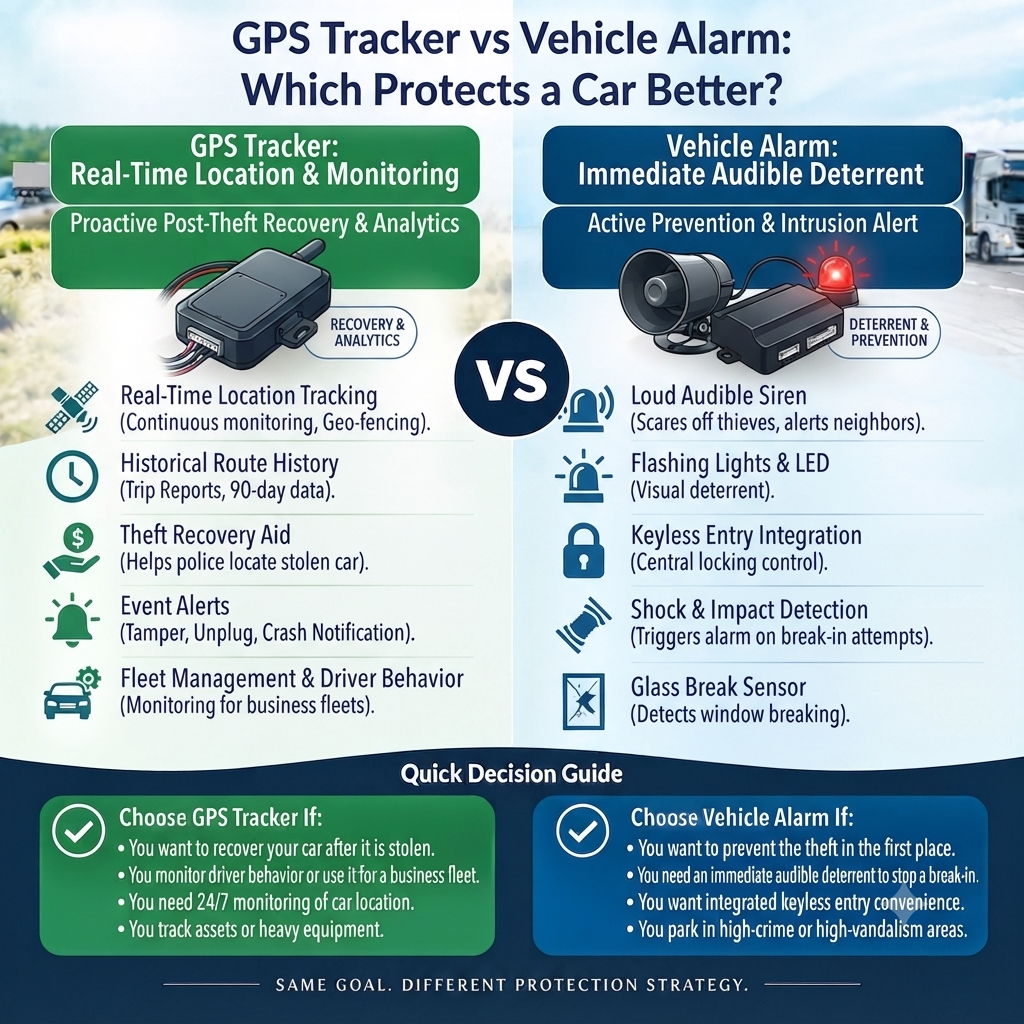
A vehicle alarm is designed to deter or draw attention at the vehicle. A GPS tracker is designed to report movement, location and device status to an authorised user. The strongest protection is usually layered: sound physical security, the factory alarm or immobiliser, and a concealed tracking system with tested alerts.
A useful implementation starts with the decision, then works backward to data, configuration and ownership. The platform should make limitations visible: last-update time, device health, asset assignment and the difference between an automated signal and a verified business event.
| Decision area | Evidence to use | Implementation rule |
| Factory alarm | Immediate local deterrence and intrusion alert | Confirm what the vehicle already includes. |
| Factory immobiliser | Prevents unauthorised starting under defined conditions | It is not the same as remote tracker-controlled starter isolation. |
| GPS tracker | Movement, geofence, power-loss and location evidence | Alerts require connectivity, configuration and an owner. |
| Physical security | Locks, secure keys, lighting and depot controls | Tracking should not replace prevention. |
Build a reliable operating process
Treat the tracking platform as one part of the operating system. Job, maintenance, finance, safety and workforce records may be needed to interpret what the device reports. The following sequence creates a repeatable control rather than another set of notifications.
- Document the vehicle’s existing alarm and immobiliser.
- Identify the realistic theft and unauthorised-use scenarios.
- Choose layered controls rather than one product claim.
- Install and conceal the tracker appropriately.
- Test movement, power-loss and offline alerts after hours.
- Create a safe police and insurer response process.
Assign a named owner to each recurring report or alert and document what closes the item. Acknowledging a notification is not the same as resolving its underlying cause. Where data affects a worker, customer or legal decision, preserve source records and provide an appropriate correction or review process.
Common mistakes and how to avoid them
Most poor outcomes come from weak definitions and governance rather than inaccurate satellite positioning. Review these risks during the pilot and again after the first reporting cycle.
- Assuming a loud alarm always receives a response
- Advertising a tracker as theft-proof
- Leaving alerts on an unattended inbox
- Publishing the tracker’s hiding place
- Personally confronting a suspected thief
Do not turn operational data into unsupported certainty. A vehicle near a site may not have completed the job; a diagnostic code may not identify the required repair; and an automated score may not fairly describe a driver. Use corroborating records and professional judgement.
Australian privacy, safety and compliance boundaries
Location history may identify workers, customers, homes and sensitive sites. Define the purpose, give required notices, limit collection, use named accounts and multi-factor authentication, restrict exports and apply a documented retention period. Workplace-surveillance and privacy requirements differ by jurisdiction and circumstance, so obtain advice for the actual operation.
For heavy vehicles, telematics can support monitoring and evidence within a Safety Management System, but it does not establish compliance by itself. Scheduling, alerts or performance targets must never pressure a driver to speed, skip maintenance, exceed work limits or operate while unfit to drive.
Record configuration changes, device-to-asset assignments and known outages. Those controls make operational reports more trustworthy and help a business explain what data could and could not show at a particular time.
Deterrence, prevention, detection and response
Security claims become clearer when controls are separated by job. Locks and secure key handling aim to prevent access. Alarms and visible deterrents aim to interrupt or discourage. A tracker detects movement and supports a response after an event. No single layer covers every failure mode.
A useful security design also considers power disconnection, underground parking, mobile coverage and delayed alerts. Device-health reporting and a current contact list can be as important as map accuracy.
How to test the security chain
Run a controlled test with authorised staff: move the stationary vehicle outside a geofence, disconnect tracker power where safe, confirm notification delivery and verify that the map timestamp updates. Record who receives the alert and what they do next. Never simulate theft in a way that risks road users or triggers an unnecessary emergency response.
Practical Australian example
A small rental operator relies on factory alarms but discovers nobody knows when a vehicle leaves the yard after hours.
A concealed hardwired tracker adds movement, geofence and power-loss alerts. The alarm remains the immediate vehicle-level deterrent, while tracking provides remote awareness and recent location.
The operator tests the alert roster monthly and follows police guidance rather than attempting recovery personally.
A 90-day implementation plan
- Days 1–15: define the business question, asset groups, baseline, users and legal requirements.
- Days 16–30: configure a pilot using representative vehicles, routes and difficult coverage or power conditions.
- Days 31–45: test timestamps, assignments, alerts, calculations, exports and failure states against source records.
- Days 46–60: issue notices, train managers and workers, establish owners and document correction and escalation paths.
- Days 61–75: deploy in controlled waves and reconcile every device, SIM and asset before accepting the installation.
- Days 76–90: compare results with the baseline, remove noisy controls and approve the next improvement cycle.
| Success test: A reader should be able to identify the next decision, the evidence required, the owner and the limitation of the GPS data. |
Questions to ask a tracking provider
- Which Australian mobile networks and radio technologies are supported, and how are coverage gaps shown?
- What update intervals, history retention, device-health alerts and exports are included?
- Can access be restricted by role, depot, vehicle group and report type?
- Which device, user, asset-assignment and configuration changes appear in the audit log?
- What are the hardware warranty, installation record, replacement process, support hours and exit costs?
- Which capabilities are rules, analytics or genuine AI, and can the supplier show the underlying evidence?
Ask for a demonstration using a realistic ordinary day and a failure case. The supplier should show a stale last-known point, an offline device, a corrected vehicle assignment and the workflow for closing an exception—not only a polished live map.
Frequently asked questions
Is a tracker better than an alarm?
They do different jobs. A tracker provides remote visibility; an alarm provides local deterrence and warning.
Does GPS tracking stop a car being stolen?
No. It can support detection and response but should sit within layered security.
Will a tracker work if power is cut?
Some units have a small backup battery and power-loss alert. Duration and behaviour vary.
Can I hide the tracker?
Concealment can reduce casual removal, but installation must remain safe and serviceable.
Should I share live location publicly?
No. Share information through authorised, secure channels and follow police and insurer instructions.
About Techtonika Autolink
Techtonika Autolink helps Australian businesses choose, install and configure GPS tracking for vehicles and mobile assets. For practical advice on hardware, professional installation and platform setup, visit https://techtonika-autolink.com/ or call 0452 653 745.